SMART AUDIT
04 Dec 2025
Are you still managing audits with spreadsheets, email chains, and paper checklists? If so, you’re not alone, but you’re also leaving efficiency, accuracy, and cost savings on the table. In 2026, organisations that have embraced audit management software are completing audits up to 70% faster while reducing errors and improving compliance outcomes.
Whether you are conducting internal audits, preparing for external compliance reviews, or managing supplier quality assessments, the right audit management software can transform your audit process from a dreaded administrative burden into a strategic advantage.
This comprehensive guide will walk you through everything you need to know about audit management software—from core features and benefits to implementation strategies and cost considerations. By the end, you’ll know exactly how to choose and implement the right solution for your organization.
Audit management software is a specialised platform designed to plan, execute, track, and report on audits throughout their entire lifecycle. Rather than relying on disconnected tools like spreadsheets, email, and paper forms, audit management software centralises all audit activities in one secure, accessible system.
These platforms automate manual processes, standardise audit procedures, and provide real-time visibility into audit status, findings, and corrective actions. Modern audit management software typically operates in the cloud, making it accessible from anywhere and enabling seamless collaboration between auditors, stakeholders, and external parties.
The typical audit management workflow includes several key stages:Â

Planning and Scheduling : The software helps create risk-based audit plans, schedule audits across multiple locations, assign resources, and establish timelines based on regulatory requirements and organizational priorities.
Preparation : Auditors can access standardized templates, checklists, and previous audit documentation. The system automatically notifies relevant stakeholders and ensures all necessary documents are available.
Execution : During the audit, teams can capture findings in real-time using mobile devices, attach photos and documents as evidence, and collaborate with team members. Offline capabilities ensure audits can continue even without internet connectivity.
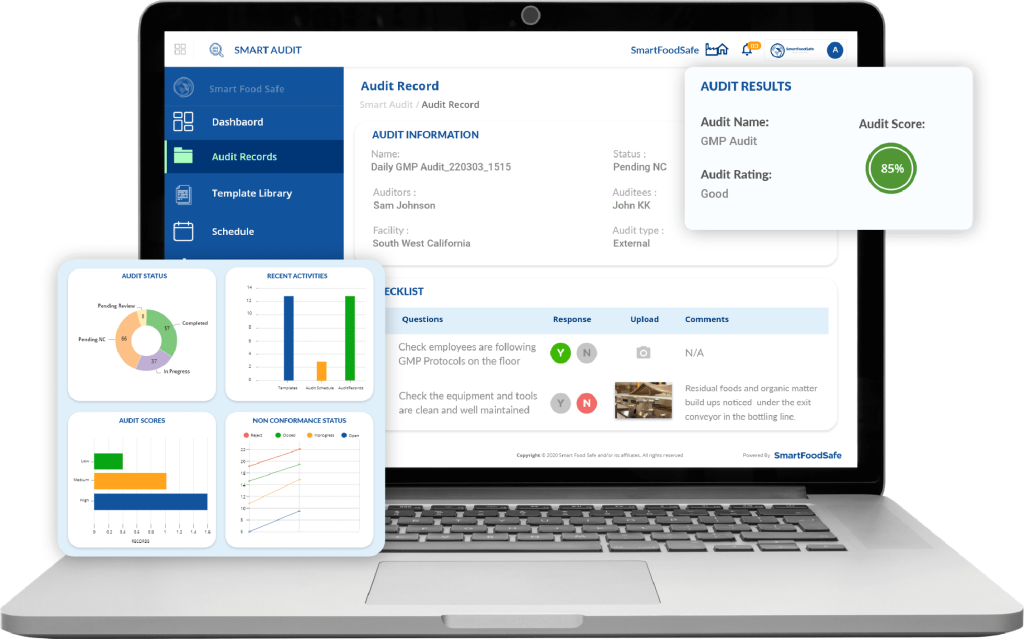
Reporting : The software automatically generates comprehensive audit reports with customizable formats, visual dashboards, and executive summaries. Reports can be instantly shared with stakeholders.
Follow-up and Remediation : Track corrective action plans, monitor remediation progress, set automated reminders, and close out audit findings once issues are resolved.
Analysis and Improvement : Advanced analytics identify trends across multiple audits, highlight recurring issues, and provide insights for continuous improvement.
Not all audit management solutions are created equal. When evaluating options, look for these essential capabilities:
Risk-based audit planning tools help prioritize audits based on organizational risk factors, regulatory requirements, and historical performance. Automated scheduling features ensure audits occur on time and resources are allocated efficiently. The system should support:
Pre-built templates for common audit types (ISO 27001, Compliance Audits, Food safety audits, ) save time and ensure consistency. However, your organization should be able to customize these templates or create entirely new ones to match your specific processes and requirements.
Key capabilities include:
Modern audits often occur in the field, on manufacturing floors, at retail locations, or at supplier facilities. Mobile apps enable auditors to:
Audits involve multiple stakeholders, auditors, department managers, executives, and external parties.
Effective collaboration features include:
Comprehensive tracking of audit findings, non-conformances, and improvement opportunities with:
For organisations managing multiple compliance requirements, framework mapping is essential:
Transform audit data into actionable insights with:
Your audit management software shouldn’t operate in isolation. Look for:
Since audit data is sensitive, security features are non-negotiable:
Organizations implementing audit management software typically experience significant improvements across multiple dimensions:
Manual audit processes are time-consuming. Audit management software reduces audit cycle time by 40–70% through:
Organizations report reducing audit completion time from 4 weeks to just 1–2 weeks, freeing up auditor time for higher-value activities.
Standardized templates and automated data collection dramatically reduce errors. Benefits include:
Stay ahead of regulatory requirements and identify risks proactively:
Break down silos and improve cross-functional teamwork:
While audit management software requires an upfront investment, it delivers significant ROI through:
Organisations see 200–300% ROI within the first year, with many achieving payback in 6–9 months.
Be constantly ready for external audits and regulatory inspections:
As your organization grows, audit management software scales effortlessly:
While any organization conducting audits can benefit, certain industries find audit management software particularly valuable:
Manufacturing organizations use audit management software to conduct quality audits, supplier assessments, ISO compliance audits, and safety inspections. Key benefits include:
Healthcare organizations face rigorous regulatory requirements and frequent audits. Audit management software helps with:
Multi-location retail and hospitality organizations benefit from:
Construction firms manage complex safety and quality requirements:
Selecting audit management software is a significant decision. Follow this framework to make the right choice:
Step 1: Define Your Requirements
Start by documenting your specific needs:
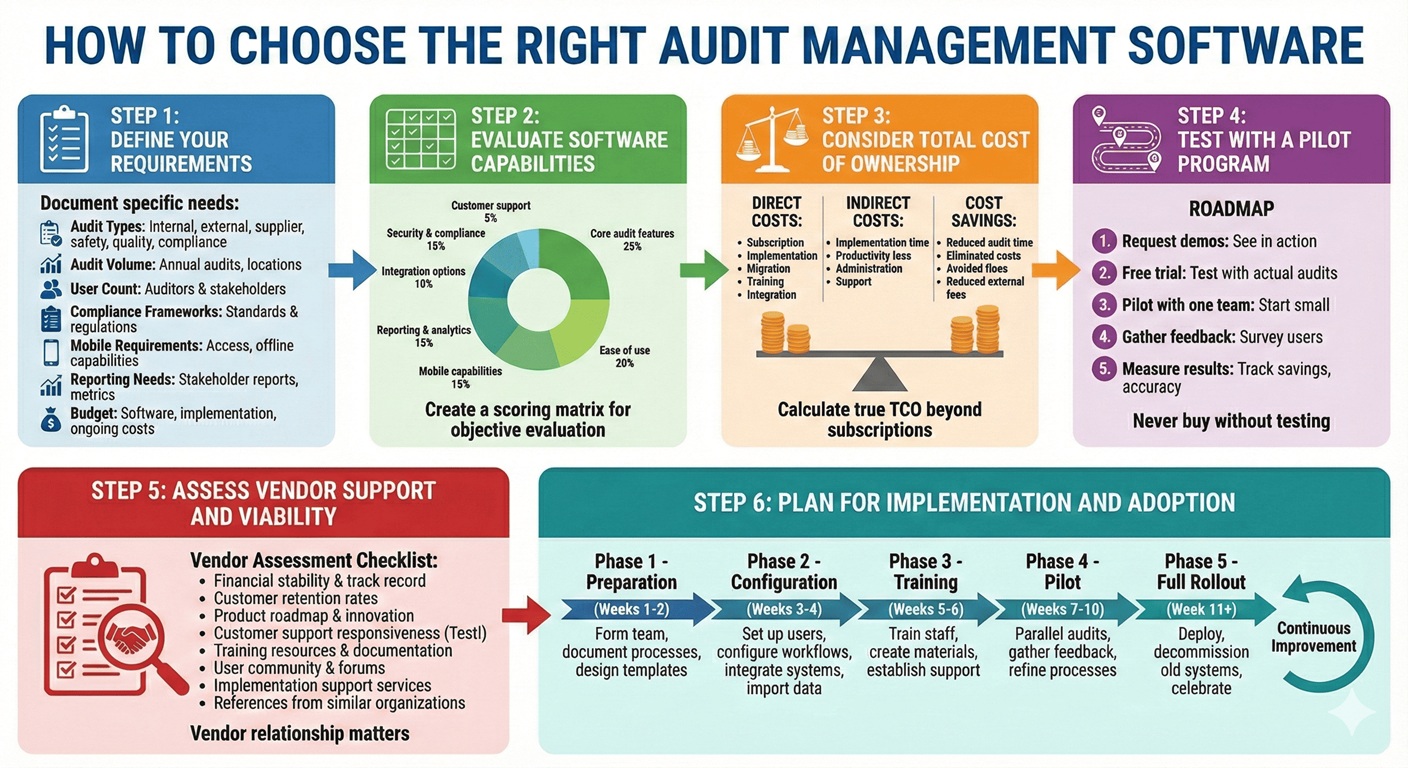
Audit Types : What types of audits do you conduct? (internal, external, supplier, safety, quality, compliance)
Audit Volume : How many audits do you perform annually? How many locations?
User Count : How many auditors and stakeholders need access?
Compliance Frameworks : Which standards and regulations must you comply  with?
Mobile Requirements : Do auditors need mobile access? Offline capabilities?
Reporting Needs : What reports and metrics do stakeholders require?
Budget : What is your budget for software, implementation, and ongoing costs?
Step 2: Evaluate Software Capabilities
Create a scoring matrix to objectively evaluate options:
Here is the Example for evaluating.
Core audit features | 25%Â |
Ease of use | 20% |
Mobile capabilities | 15% |
Reporting & analytics | 15% |
Integration options | 10% |
Security & compliance | 10% |
Customer support | Â 5% |
Step 3: Consider Total Cost of Ownership
Look beyond subscription fees to calculate true TCO:
Direct Costs :
Software subscription fees
Implementation and setup costs
Data migration expenses
Training costs
Integration development
Indirect Costs:
Time spent on implementation
Productivity loss during transition
Ongoing administration time
Support and maintenance
Cost Savings :
Reduced audit time
Eliminated software and paper costs
Avoided compliance fines
Reduced external audit fees
Step 4: Test with a Pilot Program
Never buy enterprise software without testing it first:
1. Request demos : See the software in action with your use cases
2. Â Free trial : Test with actual audits (most vendors offer 14-30 day trials)
3. Â Pilot with one team : Start small with a single audit team or location
4. Gather feedback : Survey users on usability and effectiveness
5. Measure results : Track time savings, error reduction, and user satisfaction
Step 5: Assess Vendor Support and Viability
Your relationship with the vendor matters as much as the software:
 Vendor Assessment Checklist :
  Financial stability and track record
  Customer retention rates
  Product roadmap and innovation
  Customer support responsiveness (test it during evaluation)
  Training resources and documentation
  User community and forums
  Implementation support services
  References from similar organizations
Step 6: Plan for Implementation and Adoption
Create a detailed implementation plan:
Phase 1 – Preparation (Weeks 1-2) :
– Form implementation team
– Document current audit processes
– Design templates and checklists
 Phase 2 – Configuration (Weeks 3-4) :
Set up user accounts and permissions
Configure templates and workflows
Integrate with existing systems
Import historical data
 Phase 3 – Training (Weeks 5-6) :
Train administrators
Train auditors and users
Create training materials
Establish support procedures
 Phase 4 – Pilot (Weeks 7-10) :
Run parallel audits (old and new system)
Gather feedback and optimize
Refine processes
Document lessons learned
 Phase 5 – Full Rollout (Week 11+) :
Deploy to all users
Decommission old systems
Celebrate wins
Continuous improvement
Implementation Best Practices
Successful implementations follow these proven practices:
1. Secure Executive Sponsorship
Executive support is critical for successful adoption. Ensure leadership:
– Understands the strategic value
– Communicates importance to the organization
– Allocates adequate resources
– Removes organizational barriers
– Celebrates early wins
2. Start Small and Scale
Resist the urge to deploy everything at once:
– Begin with one audit type or location
– Perfect the process before scaling
– Learn from early users
– Build confidence and expertise
– Scale progressively based on success
3. Involve End Users Early
Your auditors will make or break adoption:
– Include auditors in software selection
– Solicit feedback on templates and workflows
– Designate “champions” to advocate for the system
– Address concerns proactively
– Recognize and reward early adopters
4. Invest in Change Management
Technology is the easy part; changing behaviors is hard:
– Communicate “why” not just “what”
– Explain benefits to different stakeholder groups
– Address “what’s in it for me?”
– Provide ample training and support
– Be patient with the learning curve
 5. Clean Up Data Before Migration
Garbage in, garbage out applies to audit data:
– Archive outdated audit records
– Standardize naming conventions
– Consolidate duplicate records
– Validate data accuracy
– Document what gets migrated and what doesn’t
 6. Optimize Processes During Implementation
Don’t just digitize broken processes:
– Map current state processes
– Identify inefficiencies and bottlenecks
– Design improved future state processes
– Leverage software capabilities to optimize
– Document new standard operating procedures
 7. Provide Comprehensive Training
Different users need different training:
– Administrators: deep technical training
– Auditors: hands-on practical training
– Managers: reporting and analytics training
– Executives: dashboard and insights training
– Create job aids and quick reference guides
8. Measure and Communicate Success
Track metrics to demonstrate value:
– Time savings per audit
– Error reduction rates
– User adoption rates
– Compliance improvements
– Cost savings achieved
– Share success stories internally
The audit management software landscape continues to evolve rapidly. Here are key trends shaping the future:
AI is transforming audit management in several ways:
Predictive Analytics : ML algorithms analyze historical audit data to predict where future issues are likely to occur, enabling proactive auditing of high-risk areas.
Automated Evidence Analysis : AI can review thousands of documents, screenshots, and logs to automatically identify relevant evidence and anomalies, dramatically reducing manual review time.
Intelligent Recommendations : AI suggests corrective actions based on similar issues in past audits and industry best practices.
Natural Language Processing : Auditors can use conversational interfaces to query audit data and generate reports using plain language.
Anomaly Detection : ML algorithms continuously monitor control data to flag unusual patterns that may indicate control failures or fraud.
The shift from periodic audits to continuous assurance:
Real-time Control Monitoring : Instead of quarterly audits, systems continuously monitor control effectiveness and alert auditors to deviations immediately.
Automated Testing : Routine control tests run automatically without auditor intervention, freeing auditors for higher-value work.
Dynamic Risk Assessment : Risk scores update in real-time based on emerging threats, business changes, and control performance.
Always Audit-Ready : Organizations maintain perpetual audit readiness rather than scrambling before scheduled audits.
Mobile capabilities are becoming more sophisticated:
Augmented Reality : AR-enabled audits overlay digital checklists and instructions onto physical environments through smartphone cameras.
Voice-Activated Auditing : Hands-free audit data capture using voice commands, especially useful in manufacturing and field environments.
Wearable Integration : Smart glasses and other wearables enable truly hands-free auditing while maintaining safety.
Remote Collaboration : Virtual audits with video conferencing, screen sharing, and collaborative documentation built into the platform.
Immutable audit evidence and traceability:
Tamper-Proof Records : Blockchain technology ensures audit evidence and findings cannot be altered after creation.
Enhanced Trust : Regulators and external auditors have greater confidence in audit data integrity.
Smart Contracts : Automatically trigger remediation workflows and escalations based on predetermined conditions.
Audit management is merging with broader GRC capabilities:
Unified Risk View : Connect audit findings with enterprise risk registers and compliance programs.
Three Lines of Defense Model : Coordinate activities across operational management, risk/compliance functions, and internal audit.
Holistic Governance : Link board governance, strategic planning, and operational auditing in one platform.
Making audit data more accessible and actionable:
Interactive Dashboards : Drill down from executive summaries to detailed findings with a few clicks.
Predictive Modeling : Forecast future compliance posture and resource needs based on trends.
Benchmarking : Compare your audit performance against industry peers.
Data Storytelling : Automatically generate narrative explanations of audit data trends and insights.
Audit management software has evolved from a nice-to-have convenience to a strategic necessity for organizations serious about compliance, risk management, and operational excellence. The benefits—dramatic time savings, improved accuracy, enhanced compliance, better insights, and significant cost reduction—make a compelling case for modernizing your audit processes.
The key is choosing the right solution for your specific needs and ensuring successful implementation and adoption. Start by clearly defining your requirements, involve stakeholders early in the selection process, test thoroughly before committing, and plan for comprehensive change management.
Whether you’re conducting quality audits in manufacturing, compliance audits in healthcare, security audits in technology, or safety inspections in construction, there’s an audit management solution designed for your industry and use cases.
 Ready to transform your audit process? Â
Take these immediate next steps:
The organizations achieving the greatest success with audit management software are those that view it not just as a software purchase, but as a strategic initiative to transform how they manage risk, ensure compliance, and drive continuous improvement.
Your path to audit excellence starts today.Â
Looking for a modern, user-friendly audit management solution? Learn how Smart Audits can streamline your audit processes, improve compliance, and deliver measurable ROI in weeks, not months. Request a free demo today
While there is some overlap, they serve different primary purposes. Audit management software focuses specifically on planning, conducting, and reporting on audits—whether internal, external, supplier, or compliance audits. Quality management software (QMS) has a broader scope, managing overall quality processes including document control, training, change management, CAPA, and audits. Many modern QMS platforms include audit management as one module among many. Organizations primarily focused on audit activities typically choose dedicated audit management software, while those needing comprehensive quality management select a QMS with strong audit capabilities.
Yes, most modern audit management platforms offer offline mobile capabilities. Auditors can download audit templates and checklists to their mobile devices, conduct audits without internet connectivity (common in manufacturing plants, remote locations, or areas with poor connectivity), and automatically sync all data once connectivity is restored. This ensures audits can proceed uninterrupted regardless of internet availability. When evaluating solutions, specifically test offline functionality as implementation quality varies between vendors.
Implementation timelines vary significantly based on organizational complexity, existing processes, data migration needs, and customization requirements. Simple implementations for small teams using standard templates can be completed in 2-4 weeks. Mid-sized organizations with moderate customization typically require 6-12 weeks. Large enterprises with complex requirements, extensive integrations, and global deployments may need 3-6 months. Vendors offering rapid deployment methodologies, pre-built templates, and strong implementation support can significantly accelerate timelines. Plan for a pilot phase before full deployment to identify and resolve issues before organization-wide rollout.
Integration capabilities vary widely between platforms. Enterprise-grade solutions typically offer robust integration options including RESTful APIs for custom integrations, pre-built connectors for common platforms like ERP, CRM, and HRIS systems, webhook support for real-time data synchronization, SCIM provisioning for user management, and SSO support for authentication. During evaluation, provide vendors with a list of systems requiring integration and request demonstrations of actual integration functionality. Some vendors offer integration marketplaces or partner with SaaS platforms to simplify connections to hundreds of applications.
Organizations typically achieve 300-500% ROI over three years, with many reaching payback within 6-12 months. Primary ROI drivers include reduced audit cycle time (40-70% reduction), decreased labor costs as audits require fewer hours, eliminated paper and manual process costs, reduced compliance violations and associated fines, lower external audit fees due to better preparation, and improved audit quality catching issues earlier. Calculate your specific ROI by measuring current audit costs (labor hours, materials, compliance issues), estimating time savings percentages, and factoring in software costs including subscription, implementation, and training.
Modern cloud-based audit management platforms are designed for business user administration, requiring minimal IT involvement for day-to-day operations. You’ll need IT support during initial implementation for integrations and SSO setup, but ongoing administration—including creating audit templates, managing users, generating reports, and configuring workflows—is typically handled by business administrators with provided training. Look for solutions with intuitive administrative interfaces, comprehensive documentation and training, and responsive vendor support to minimize IT dependency. Organizations with complex custom integrations or specific security requirements may need occasional IT involvement for advanced scenarios.
Absolutely. While enterprise organizations with large audit teams see substantial benefits, small businesses conducting even a few audits annually can realize value through time savings, improved consistency, better documentation, enhanced compliance, and professional presentation. Many vendors offer affordable plans designed specifically for small businesses, with simplified features, lower user counts, and reasonable pricing (often $500-$2,000/month). Some platforms offer free plans with basic capabilities suitable for very small teams. Small businesses should focus on solutions with quick implementation, minimal training requirements, and excellent support rather than complex enterprise features they don’t need.
Have a consistent, working internal audit strategy that continuously brings about compliance in the middle of regulatory updates with Smart Audit’s audit management features.
Signup to receive latest news, insights and updates on audits management