English
 French
 Spanish


Audit workflow management has moved from being a compliance checkbox to becoming a strategic enabler in 2025. With regulators demanding faster, risk-focused audits and organisations looking for real-time insights, businesses need structured workflows that reduce inefficiencies and eliminate manual bottlenecks.
In this guide, we’ll break down the seven key steps of an effective audit workflow, explore the tools that streamline each stage, and highlight common pitfalls to avoid.
Why Modernise Audit Workflow Management in 2025?
Traditional audit processes spread across spreadsheets, emails, and shared drives often lead to missed deadlines, incomplete evidence, and inconsistent reporting. In today’s environment, this is not just inefficient; it’s risky.
Modern audit workflow management emphasizes:
- Risk-based planning to prioritize high-impact areas.
- Automation and integration for evidence collection and reporting.
- Closed-loop issue tracking to ensure findings are resolved, not just documented.
Analyst reports and vendor playbooks show that companies using centralised audit management platforms complete audits 30–40% faster and reduce remediation times significantly.
The 6 Steps of an Efficient Audit Workflow
1. Risk Mapping & Annual Plan
Kick off your audit workflow by zeroing in on what matters most: the risks that could derail your manufacturing operations. Build an annual audit plan by assessing risks with a simple formula,impact times likelihood to pinpoint high-priority issues. For instance, a manufacturing plant producing automotive parts might prioritize equipment breakdowns or supply chain delays over minor clerical errors. Engage stakeholders like plant managers, safety officers, or quality control leads to align the plan with their concerns, such as OSHA compliance or supplier reliability. This ensures your audits support the organization’s goals, like maintaining production quality and safety standards. A focused plan channels resources to critical areas, building trust with leadership by showing you’re tackling their top concerns effectively.
2. Scoping & Resource Assignment
Next, set clear boundaries for your audit. Define the objectives, scope, and timeline upfront to avoid wasting time on irrelevant areas. For instance, if auditing a supply chain, focus only on key vendors rather than every supplier. Assign lead auditors and subject matter experts based on their skills, someone with IT audit experience for tech-heavy projects, for example. Use scope templates to keep things consistent and prevent scope creep, which can throw off your schedule. Clear scoping keeps everyone on the same page and makes the process smoother.
3. Planning & Test Design
Good planning is the backbone of an efficient audit. Build test matrices that connect controls to specific test cases, ensuring you cover all major risks. Reach out to process owners early to request evidence like contracts or compliance reports. Using prebuilt test libraries for recurring audits, such as annual financial reviews, saves hours of work. Make sure your tests are clear and measurable to avoid confusion later. Solid planning upfront means less backtracking and a faster audit.
4. Fieldwork & Evidence Collection
When it’s time for fieldwork, focus on gathering data efficiently. Use mobile checklists for onsite audits to capture information quickly and accurately think of a warehouse audit where you’re checking inventory in real-time. Attach evidence directly to audit tasks in a centralized system, like a cloud-based platform, to avoid version mix-ups. Document findings as you go to keep things organized. This step builds a clear audit trail, making it easier to prove compliance to regulators or stakeholders.
5. Testing, Analysis & Issue Logging
Now, test your controls and analyze the results carefully. Log any issues whether minor, like a missing document, or critical, like a major compliance gap in an automated tracking tool. Assign owners and deadlines right away to keep things moving.
For example, if a control test reveals outdated software, log it and notify the IT team immediately. Clear, timely issue logging ensures nothing slips through the cracks and keeps the audit on track.
6. Remediation Follow-up & Continuous Monitoring
Finally, close the loop by tracking fixes. Verify remediation with evidence, like updated policies or system patches, before closing issues. Use tools like dashboards to monitor compliance over time, catching potential problems early. For instance, continuous monitoring might flag a recurring issue in expense reporting. This step shows regulators and stakeholders that you’re serious about compliance, building trust and proving the audit’s value.
Recommended Tools for Audit Workflow Management
- Audit Management Software: Platforms like Smart Audit, Audit-board, or Metric-stream offer end-to-end workflows, from planning to remediation.
- Document & Evidence Management: Cloud-based repositories with access control ensure evidence security.
- Data Analytics & Automation Tools: Automate sampling and detect anomalies.
- Collaboration Tools: Integrations with Slack or Microsoft Teams streamline communication with process owners.
- Dashboards & BI Tools: Real-time KPIs (open findings, remediation timelines, risk coverage) provide actionable insights.
Common Pitfalls and How to Avoid Them
- Overly broad scopes → Narrow down with scope templates.
- Scattered evidence → Require uploads within the audit tool.
- Missed remediation deadlines → Use automated reminders and escalation.
- Overly technical reports → Provide dual-level reporting for execs and auditors.
- Audit backlog → Prioritise audits based on risk scores, not tradition.
By fixing these pitfalls, audit teams not only save time but also improve compliance readiness.
Audit Workflow

How Smart Audit Brings It All Together
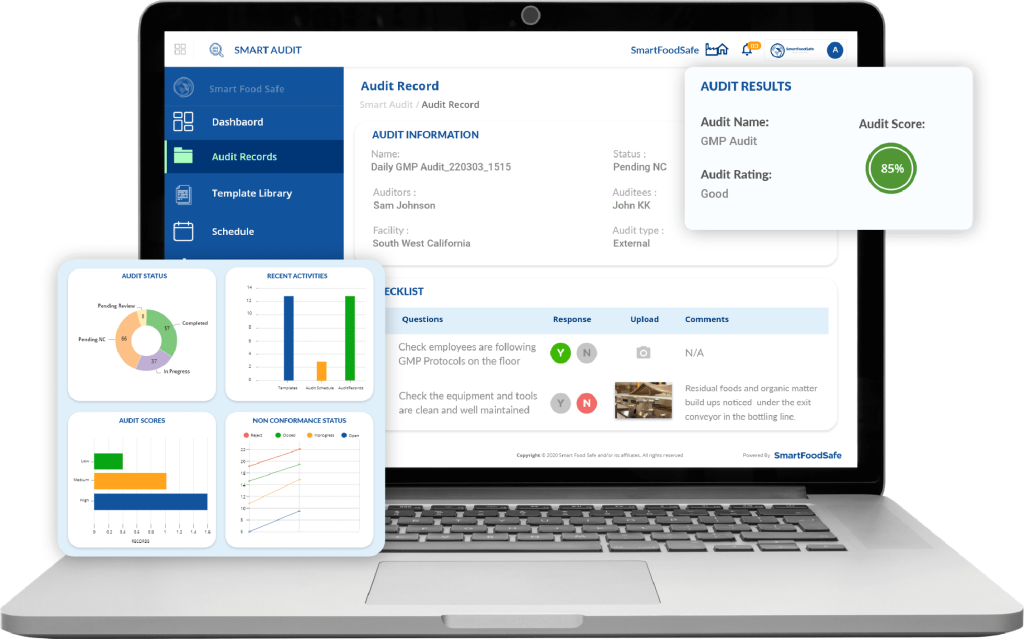
While many tools exist, Smart Audit simplifies workflow management by combining scheduling, checklists, issue tracking, and executive dashboards in one platform. Screenshots to showcase:
- Audit schedule calendar (for planning).
- Mobile checklist view (for fieldwork)
- Issue tracking dashboard (for remediation).
Key Metrics to Track Post-Implementation
- % of audits completed on time
- Average remediation time (days)
- % of findings closed with verified evidence
- Audit coverage vs. top enterprise risks
- Stakeholder satisfaction with reports
Tracking these metrics helps prove ROI to leadership and strengthens audit credibility.
In 2025, audit workflow management is no longer just about compliance; it’s about efficiency, risk visibility, and value creation. By following the Six-step workflow, adopting the right tools, avoiding common pitfalls, and using tools like Smart Audit in your organization can transform audits into a strategic advantage.